
Nano Banana AI 3D Figurine Generator: How to Make Yours for Free
Artificial intelligence has opened up exciting possibilities for creators, hobbyists, and anyone who loves turning ideas into visual art. One of the most talked-about tools right now is Nano Banana, a feature of Google Gemini AI that lets you generate lifelike 3D figurines from your photos or even just text prompts. Whether you’re a beginner or a digital art enthusiast, Nano Banana provides a fun and creative way to bring your imagination to life. In this guide, we’ll walk through exactly how to create your own figurines, share sample prompts, and offer practical tips for best results.
What is Nano Banana AI?
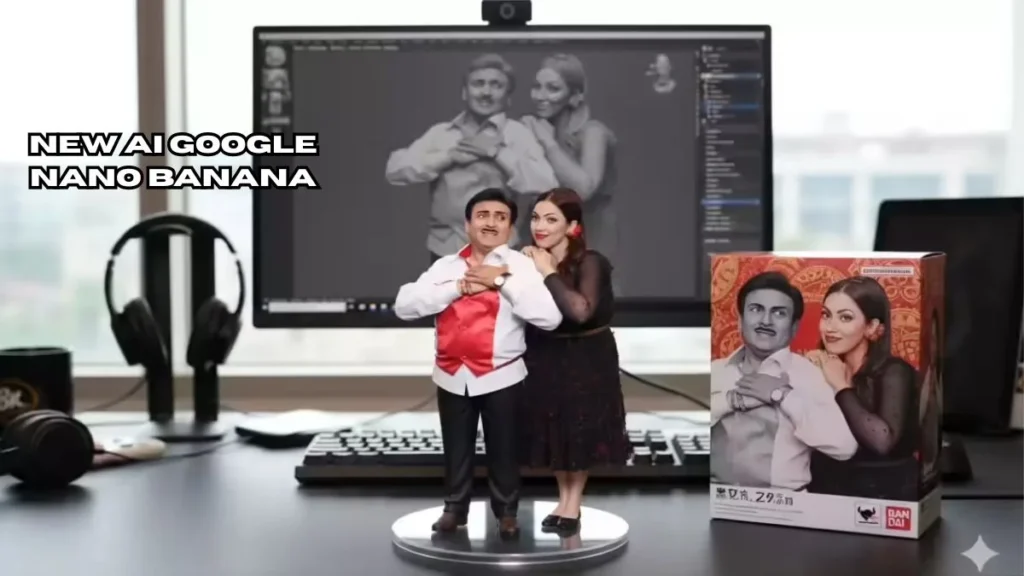
Nano Banana is part of Google Gemini’s AI suite and specializes in creating hyper-realistic 3D figurines. Unlike traditional 3D modeling software, it doesn’t require years of experience. You can either upload a photo or write a detailed prompt describing the character or object you want to create. The AI then generates a digital figurine, complete with realistic textures, lighting, a display base, and optional packaging.
These figurines are perfect for sharing on social media, designing collectibles, or even using as visual references for art projects. The AI is particularly impressive in capturing fine details like shadows, reflections, and materials, giving your figurine a professional, lifelike appearance. (Jagran Josh Guide)
Step-by-Step Guide to Creating Your Nano Banana Figurine
-
Access Google Gemini AI Studio
Open the Gemini app or visit AI Studio online. Make sure you have access to the latest version (2.5 “Flash Image”), which supports Nano Banana 3D figurine generation. -
Decide on Input Method
-
Photo + Prompt: Upload a clear image of yourself, a pet, or any object. This helps the AI capture accurate likenesses and poses.
-
Prompt Only: Describe your character in words and let the AI generate a figurine from scratch. This is perfect for fantasy creations or abstract designs.
-
-
Use a Sample Prompt
Here’s a tried-and-true prompt to start with:
“Create a 1/7 scale commercialized figurine of the characters in the picture, in a realistic style, in a real environment. Place the figurine on a computer desk with a round transparent base. Include a packaging box with original artwork. The computer screen shows the 3D modeling process of the figurine.”
You can customize details like scale, environment, materials, or style. For example, switch the base to wood, change lighting to soft daylight, or opt for a cartoonish finish for a playful look.
-
Generate and Refine
Click “Generate” and review the figurine. Look for details such as facial expression, posture, lighting, and texture. If something looks off, tweak the prompt or try a different photo. Repeat until you’re satisfied with the result.
Creative Prompt Ideas
-
Pet Action Figure: “Turn my dog into a realistic collectible action figure on a miniature shelf with a tiny packaging box.”
-
Fantasy Character: “Generate a magical creature figurine with flowing robes and glowing accessories in a mystical forest environment.”
-
Retro 16-bit Character: “Create a pixelated, 16-bit game-style figurine of this character on a gaming desk.”
Experimenting with prompts is the key to unlocking creative possibilities. Each small adjustment can dramatically change the appearance of the figurine, so feel free to play with poses, lighting, and materials.
Tips for Best Results
-
Respect copyright and privacy. Avoid using real people without permission.
-
Start simple. Begin with one character or object before moving on to complex scenes.
-
Review AI outputs critically. The AI is powerful, but it may sometimes produce unusual proportions or reflections. Minor tweaks in the prompt often fix these.
-
Some outputs carry visible watermarks to indicate AI generation; this is normal and expected.
Why Nano Banana Matters
Nano Banana is more than just a fun tool. It represents a new era in digital creation where high-quality 3D art is accessible to everyone. Artists, hobbyists, and content creators can now generate professional-looking figurines in minutes without expensive software or technical expertise. The trend also encourages experimentation, social sharing, and community engagement, as many users post their creations online, sparking inspiration for others.
-
Stay updated with current events in Nepal, including protests and social movements, by visiting Nepal News
-
Learn more about the Nano Banana AI trend and its viral rise at NDTV
Conclusion
Nano Banana AI figurines are a creative breakthrough, making it possible for anyone to transform ideas into lifelike digital collectibles. With this guide, sample prompts, and tips, you now have everything needed to start creating your own figurines. The best part? It’s free, fast, and fun. Whether you want to showcase your creations online, design unique gifts, or explore digital art, Nano Banana opens a world of possibilities.
1 thought on “How to Create Nano Banana AI 3D Figurines for Free: Step-by-Step Guide”